How does your FPV drone receive commands — and how does the video get back to your goggles?
These are two separate communication systems.
The first one is the control link.
The second one is the FPV video link.
One system sends your commands to the drone.
The other system sends the live image from the drone back to you.
Understanding this separation is one of the most important steps in learning how FPV drones really work.
Before you build, understand the signal flow.
The Two Main Communication Systems
An FPV drone does not use only one wireless connection.
It normally has two main communication paths:
- Control link
- Video link
The control link carries pilot commands.
The video link carries the live camera image.
These systems work together during flight, but they are not the same thing.
If you confuse them, FPV wiring and troubleshooting can become difficult.
If you understand them separately, the whole drone becomes much easier to understand.
What the Control Link Does
The control link is the system that allows the pilot to control the drone.
When you move the sticks on your radio controller, your inputs are converted into digital commands.
These inputs include:
- throttle
- roll
- pitch
- yaw
- arm switch
- flight modes
- beeper switch
- other auxiliary channels
Those commands are sent wirelessly from the radio controller to the receiver mounted on the drone.
In our beginner 5-inch FPV build, we use ExpressLRS, also known as ELRS.
What Is ExpressLRS?
ExpressLRS is an open-source radio control link protocol used widely in modern FPV drones.
It is known for:
- low latency
- long range
- strong reliability
- good penetration
- high update rates
- modern FPV performance
- affordable hardware options
- active community development
For beginner FPV builds, ExpressLRS is a strong choice because it provides excellent performance without requiring expensive proprietary radio systems.
The radio controller sends commands.
The ExpressLRS receiver receives them.
Then the receiver passes those commands to the flight controller.
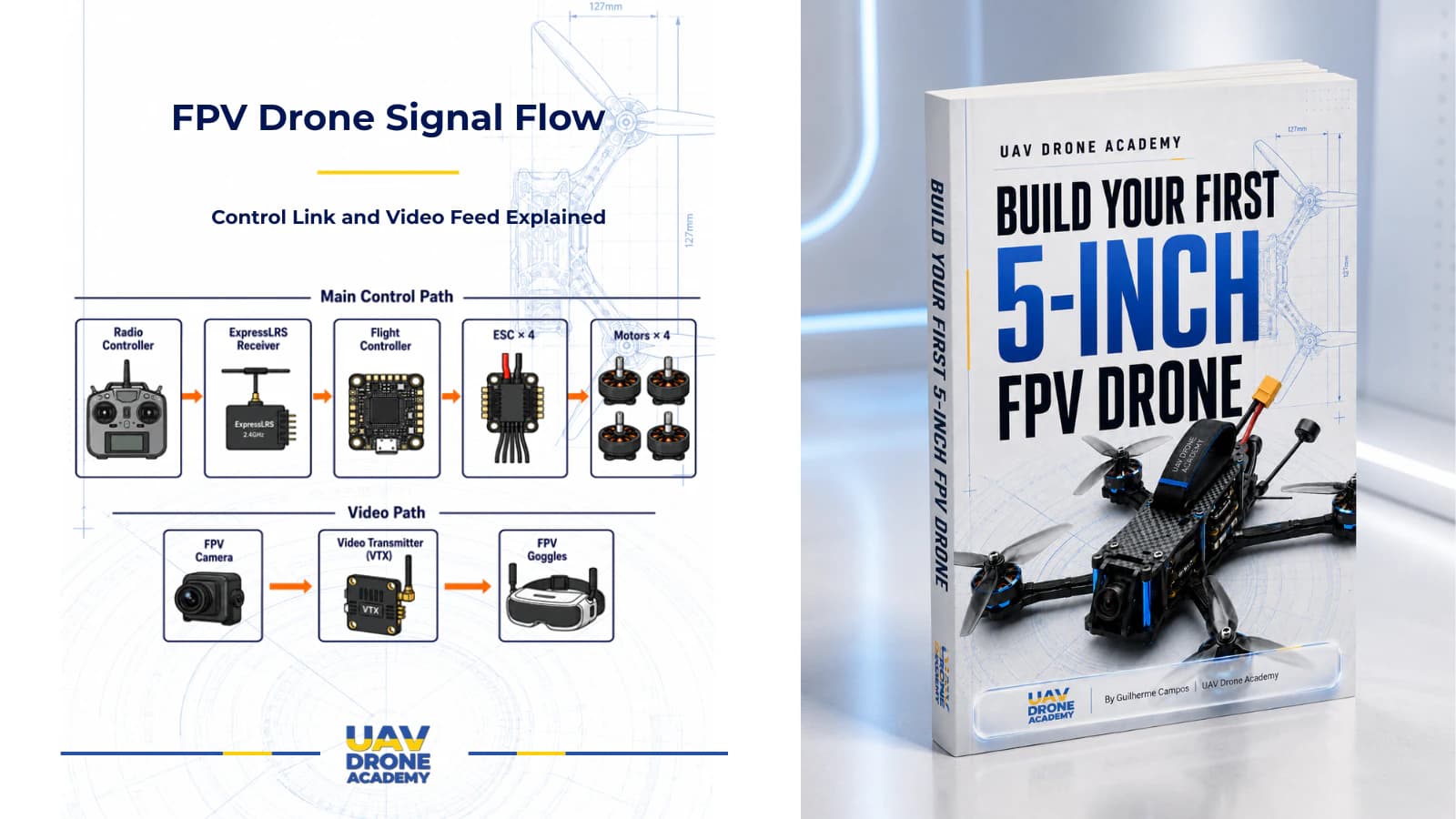
The Main Control Path
The main control path looks like this:
Radio Controller → ExpressLRS Receiver → Flight Controller → ESCs → Motors
This is the path that turns your stick movement into motor output.
Each part has a specific role.
The radio controller is where the pilot gives commands.
The ExpressLRS receiver receives those commands on the drone.
The flight controller processes the commands and stabilizes the aircraft.
The ESCs control motor speed.
The motors spin the propellers and create thrust.
Step 1 — Radio Controller
The radio controller is the pilot’s command device.
When you move the sticks, the radio controller reads your input.
For example:
- throttle stick controls total power
- roll stick controls left and right rotation
- pitch stick controls forward and backward rotation
- yaw stick controls nose direction
- switches control modes, arming, beeper, or other functions
The radio controller does not directly spin the motors.
It sends command data to the receiver.
The drone still needs the flight controller to interpret those commands and stabilize the aircraft.
Step 2 — ExpressLRS Receiver
The receiver is mounted on the drone.
Its job is to receive the radio signal from the controller.
In an ExpressLRS setup, the receiver listens for the signal from the paired radio transmitter.
Once it receives the command data, it sends that data to the flight controller.
The receiver is small, but it is critical.
If the receiver loses signal or is wired incorrectly, the drone cannot respond properly to pilot commands.
This is why receiver wiring, antenna placement, and binding are so important.
Step 3 — Flight Controller
The flight controller is the brain of the FPV drone.
It receives command inputs from the receiver.
But it does not simply pass those commands directly to the motors.
Instead, it combines pilot input with sensor data.
The flight controller uses information from sensors such as:
- gyroscope
- accelerometer, depending on mode
- voltage sensor
- current sensor, if available
- receiver data
- sometimes GPS or other peripherals
It uses this information to calculate how the drone should move.
Then it sends motor commands to the ESCs.
Step 4 — ESCs
ESC means Electronic Speed Controller.
The ESCs receive commands from the flight controller and control how fast each motor spins.
On many modern 5-inch FPV drones, the ESC is a 4-in-1 board.
That means one board controls all four motors.
The flight controller sends motor signals to the ESC.
The ESC converts those signals into controlled electrical power for each motor.
Without ESCs, the flight controller could not directly drive the motors.
Step 5 — Motors
The motors receive power from the ESCs.
Each motor spins a propeller.
By changing motor speed, the drone creates different amounts of thrust at each corner.
This is how the drone:
- climbs
- descends
- pitches forward
- pitches backward
- rolls left
- rolls right
- yaws
- stabilizes itself
The pilot gives commands.
The flight controller calculates motor response.
The ESCs control power.
The motors create movement.
The Control Link Is Not the Video Link
A very important beginner concept is this:
control commands and FPV video are not the same link.
The control link sends commands from the pilot to the drone.
The video link sends the live image from the drone back to the pilot.
They usually use different hardware.
They may use different frequencies.
They are configured differently.
They fail differently.
They are troubleshot differently.
If your drone has radio control but no video, the control link may be working while the video system has a problem.
If you see video but the drone does not respond to the radio, the video system may be working while the control link has a problem.
Understanding this separation makes troubleshooting much easier.
What the FPV Video Link Does
The FPV video link allows the pilot to see from the drone’s perspective.
The camera captures the live image.
The video transmitter sends that image wirelessly.
The goggles receive the signal and display the live feed.
This is what makes FPV possible.
Without the video link, the drone could still receive commands, but the pilot would not be able to fly from the onboard perspective.
The Main Video Path
The basic video path looks like this:
FPV Camera → VTX → FPV Goggles
This path is separate from the control path.
The FPV camera captures the image.
The VTX sends the image wirelessly.
The goggles receive and display the video.
In analog FPV, this video signal is usually simple, direct, and low-latency.
In digital FPV, the video path includes more digital processing and compatible digital goggles.
The basic idea is the same:
camera captures image, transmitter sends image, goggles display image.
Step 1 — FPV Camera
The FPV camera is mounted on the front of the drone.
It captures the live image that the pilot sees.
Camera quality affects:
- image clarity
- low-light performance
- field of view
- color response
- latency
- how easily the pilot can see obstacles
The camera is the pilot’s eyes.
If the camera is dirty, loose, angled incorrectly, or damaged, flying becomes much harder.
Step 2 — VTX
VTX means Video Transmitter.
The VTX receives the video signal from the FPV camera and transmits it wirelessly to the goggles.
In an analog FPV build, the VTX usually sends analog video on a selected channel and power level.
Important VTX considerations include:
- frequency band
- channel
- output power
- antenna connection
- cooling
- mounting
- wiring
- VTX control, such as SmartAudio or Tramp, if used
The VTX must always have a proper antenna connected before it is powered.
Powering a VTX without an antenna can damage it.
Step 3 — FPV Goggles
FPV goggles receive the video signal from the drone.
They display the image so the pilot can fly from the drone’s point of view.
Goggles may use:
- built-in receivers
- external receiver modules
- omni antennas
- patch antennas
- analog receivers
- digital receivers, depending on the system
The goggles are part of the video system, not the control system.
They allow you to see.
They do not directly control the drone.
Why the Drone Needs Both Systems
An FPV drone needs both systems to fly properly from the pilot’s perspective.
The control link lets you command the drone.
The video link lets you see where the drone is going.
If the control link fails, the drone may enter failsafe.
If the video link fails, the pilot may lose visual reference.
Both systems are important for safe FPV flight.
A reliable FPV build must have:
- solid radio control
- reliable receiver wiring
- safe antenna placement
- clean video signal
- secure VTX antenna
- readable OSD
- good goggles reception
Signal Flow During a Flight
During flight, both systems work at the same time.
The pilot moves the sticks.
The radio controller sends commands to the receiver.
The receiver sends command data to the flight controller.
The flight controller calculates motor output.
The ESCs drive the motors.
The motors spin the propellers.
At the same time, the FPV camera captures the live view.
The VTX transmits the video.
The goggles receive the video.
The pilot sees the image and gives the next command.
This loop happens continuously during FPV flight.
Why This Matters for Troubleshooting
Understanding signal flow helps you diagnose problems.
For example:
If the Drone Does Not Respond to Stick Inputs
Check the control path:
- radio controller
- model selection
- ExpressLRS binding
- receiver power
- receiver wiring
- UART configuration
- Betaflight receiver tab
- channel mapping
- failsafe settings
If the Motors Do Not Spin Correctly
Check the motor control path:
- flight controller configuration
- ESC connection
- motor protocol
- motor order
- motor direction
- ESC power
- solder joints
- Betaflight motor tab
If You Have No Video
Check the video path:
- FPV camera power
- camera wiring
- VTX power
- VTX channel
- VTX antenna
- goggles channel
- goggles receiver
- video cable
- OSD/video wiring
If You Have Video But No Control
The video path may be working, but the control path may have a problem.
Check:
- radio controller
- ExpressLRS receiver
- binding phrase
- receiver antenna
- UART setup
- Betaflight receiver configuration
If You Have Control But No Video
The control path may be working, but the video path may have a problem.
Check:
- FPV camera
- VTX
- VTX antenna
- goggles
- video channel
- power wiring
This is why separating control and video in your mind is so important.
Control Link Failure vs Video Link Failure
A control link failure and a video link failure are different problems.
A control link failure affects your ability to command the drone.
A video link failure affects your ability to see.
If control is lost, the drone should enter failsafe behavior according to your setup.
If video is lost but control remains, the drone may still respond to commands, but you may not be able to safely fly it.
Both situations are serious.
Both require safe procedures.
For beginners, the best approach is to fly close, maintain strong signal, and avoid pushing range limits.
How OSD Fits Into the Video Path
OSD means On-Screen Display.
It shows important flight information in your goggles.
Typical OSD information may include:
- battery voltage
- flight time
- warnings
- receiver link quality
- throttle position
- flight mode
- RSSI dBm or signal indicator
- VTX information
In analog FPV, the flight controller usually overlays OSD information onto the video signal before it reaches the VTX.
That means the video path may look like this:
FPV Camera → Flight Controller OSD → VTX → FPV Goggles
This still belongs to the video system, but the flight controller is involved in adding data to the image.
Why ExpressLRS Does Not Send Your Video
ExpressLRS is for radio control.
It sends control data from the radio controller to the receiver on the drone.
It does not send your FPV camera image to the goggles.
The FPV video requires a separate video transmitter and compatible goggles or receiver.
This is a common beginner confusion.
ExpressLRS controls the drone.
The VTX sends the video.
They are different systems with different jobs.
Why the VTX Does Not Control the Drone
The VTX sends video.
It does not control the motors.
It does not receive stick inputs.
It does not replace the receiver.
It does not tell the flight controller what the pilot wants.
If your VTX is working, you may see video in the goggles.
But the drone still needs a receiver and control link to respond to the radio.
Why the Flight Controller Connects to Both Systems
The flight controller sits at the center of many systems.
It receives control inputs from the receiver.
It sends motor commands to the ESCs.
It may also interact with the video system by:
- adding OSD
- controlling VTX channel and power
- sending MSP DisplayPort data in digital systems
- reporting warnings and telemetry
This makes the flight controller the central coordinator of the drone.
But the control link and video link remain separate systems.
Common Beginner Mistakes
Thinking ExpressLRS Sends Video
ExpressLRS does not send FPV video.
It sends radio control commands.
Thinking the Goggles Control the Drone
The goggles show the image.
The radio controller controls the drone.
Thinking One Antenna Handles Everything
The receiver antenna and VTX antenna are separate.
They serve different systems.
Troubleshooting Video Problems in the Receiver Tab
The Betaflight Receiver tab helps diagnose radio control input, not FPV video.
Troubleshooting Radio Problems by Changing VTX Channel
Changing the VTX channel affects video, not radio control.
Ignoring Antenna Placement
Both control and video antennas need good placement.
Bad antenna placement can reduce reliability.
Forgetting That OSD Depends on Video Path
If OSD is missing, the issue may be related to flight controller video wiring, OSD configuration, or digital OSD setup.
What Beginners Should Remember
For beginners, the key idea is simple:
control and video are separate systems.
The control path is:
Radio Controller → ExpressLRS Receiver → Flight Controller → ESCs → Motors
The video path is:
FPV Camera → VTX → FPV Goggles
The flight controller is the brain of the drone.
The receiver brings in pilot commands.
The ESCs control motor power.
The motors create movement.
The camera captures the image.
The VTX sends the image.
The goggles display the image.
Once you understand this, FPV drone wiring and troubleshooting become much easier.
Part of the Book
This content is part of our book:
Build Your First 5-Inch FPV Drone │ UAV Drone Academy
A complete beginner’s guide designed to help new pilots understand, build, configure, test, fly, maintain, and upgrade their first 5-inch FPV drone with confidence.
Before you build, understand the signal flow.
Conclusion
An FPV drone uses two separate communication systems.
The control link sends pilot commands from the radio controller to the drone.
In our beginner 5-inch FPV build, that control system uses ExpressLRS.
The command path is:
Radio Controller → ExpressLRS Receiver → Flight Controller → ESCs → Motors
The video link sends the live camera image back to the pilot.
The video path is:
FPV Camera → VTX → FPV Goggles
One system controls the drone.
The other system sends the live image back to the pilot.
They work together, but they are not the same thing.
Understanding this separation is one of the most important steps in learning how FPV drones really work.
Before you build, understand the signal flow.