You finally sit down to order your first set of propellers, and the store listing shows something like 5.1×4.1×3. No explanation. No diagram. Just three numbers, as if everyone was born knowing what they mean.
Understanding propeller size and pitch is one of those small skills that separates people who copy shopping lists from people who actually understand their drone. The basic notation is simple once you know what to look for. The important part is learning to distinguish an explicit propeller specification from a manufacturer's model or type code.
In this lesson, we decode a common propeller specification, look at what diameter, pitch, and blade count do to your drone's behavior, and explain when you should check the manufacturer's official specifications instead of trying to decode a product name.
What Does 5.1×4.1×3 Mean on a Propeller?
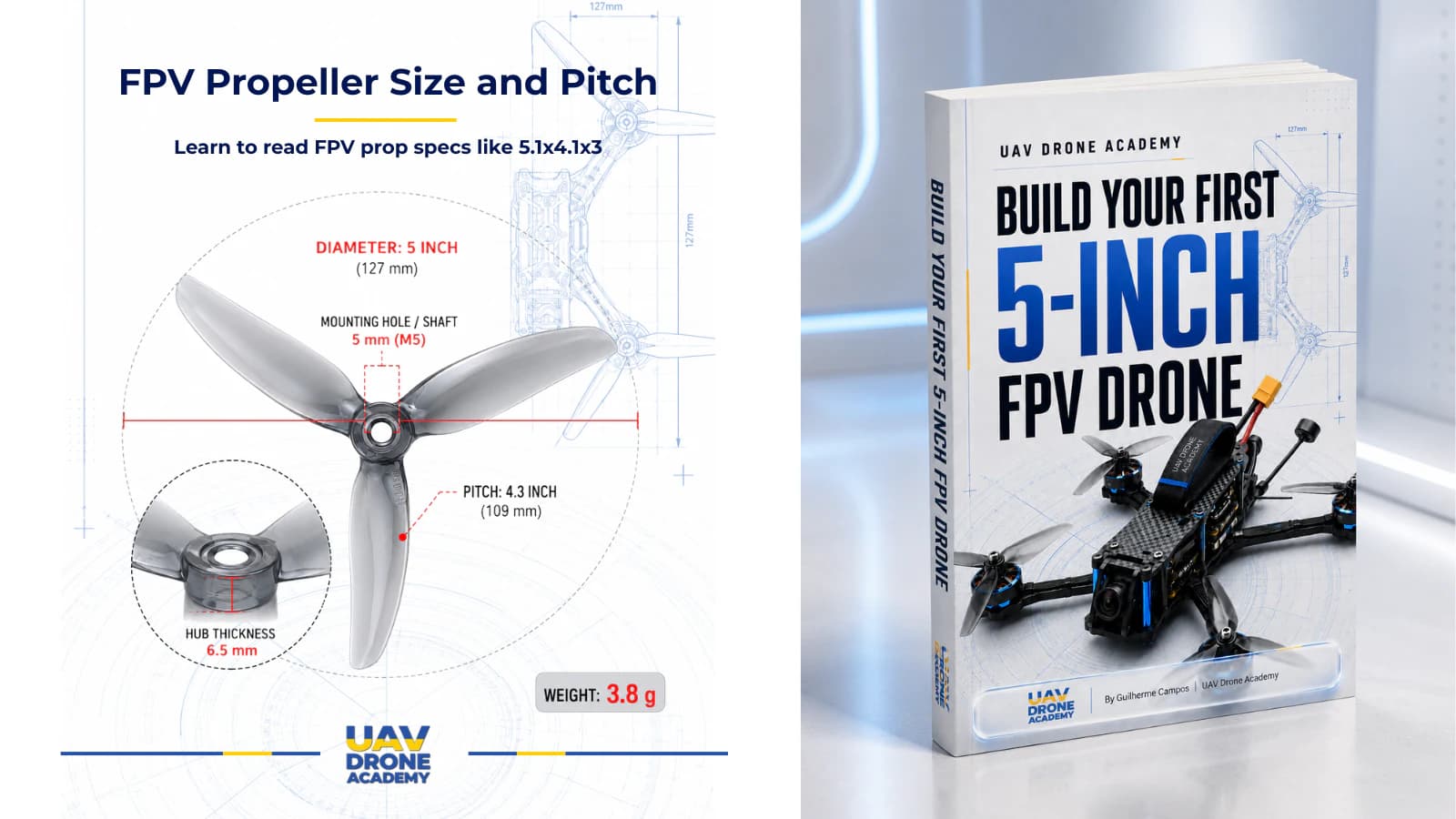
When a propeller specification is written explicitly as 5.1×4.1×3, it typically describes diameter × pitch × blade count.
In this example:
- 5.1 is the propeller diameter in inches
- 4.1 is the nominal pitch in inches
- 3 is the blade count
So 5.1×4.1×3 describes a 5.1-inch tri-blade propeller with a nominal 4.1-inch pitch.
The key word here is explicitly.
Not every number in a propeller product name should be decoded this way. Manufacturers may use model names, type codes, series names, or compressed naming systems that follow their own conventions.
The practical rule is simple: if the dimensions are written explicitly as something like 5.1×4.1×3, you can read the three values directly. If you are looking at a compact product code or model name, check the manufacturer's official specifications before decoding it.
One detail worth knowing: the FPV world measures props in inches, even in countries that use metric for almost everything else. Learn to think in inches for propeller size and pitch, and product comparisons become much easier.
Explicit Prop Specs vs. Manufacturer Model Codes
One of the easiest mistakes for a beginner is assuming that every number printed in a propeller product name describes its dimensions.
That is not always true.
An explicit specification such as 5.1×4.1×3 clearly presents three values that can be read as diameter, nominal pitch, and blade count.
A product name such as 51466 MCK V2, however, may include a manufacturer-specific type or model code. The numbers should not be decoded automatically unless the manufacturer defines the naming convention.
For example, Gemfan officially lists the Hurricane 51466 MCK V2 with a 3.6-inch pitch, 3 blades, and a 131.8 mm prop disk diameter. The product type and the dimensional specifications are presented separately.
The lesson is simple: read explicit dimensions as dimensions; verify product codes against the official specifications.
Diameter: How Big the Circle Is
Diameter is the full width of the circle the blade tips trace as the prop spins. It is the most physical of the three values because it is limited by your frame.
A 5-inch frame is designed around approximately 5-inch props, with enough clearance between the prop tips, frame, and other components. Install a propeller that is too large and the blades can hit the frame, components, or each other.
A larger diameter generally moves more air per rotation and can produce more thrust at lower RPM. A smaller diameter usually has less rotational inertia and can change speed more quickly, which can make the drone feel more responsive.
This is one reason the 5-inch class became so popular for freestyle: it offers a strong balance between thrust, agility, component availability, and overall size.
If you want the deeper story of why the whole platform is named after the propeller size, read what the 5-inch measurement really means.
For a 5-inch build, diameter is largely decided by the frame and the clearance available. In practice, 5.0-inch and 5.1-inch propellers are common in this class. Pitch and blade geometry are where the flight character starts to change more noticeably.
What Is Propeller Pitch?
Pitch is the theoretical distance the propeller would travel forward in one full rotation if it advanced through an ideal medium with no slip.
Picture a screw going into wood: one full turn moves it forward by a distance related to the geometry of the thread. Propeller pitch uses a similar theoretical idea, but a propeller operates in air rather than a solid material.
Because a propeller works in a fluid, its actual advance through the air does not equal the nominal pitch value. Aerodynamic slip and the flight condition affect the real result.
That is why nominal pitch is useful for understanding and comparing propeller geometry, but it should not be treated as a direct measurement of drone speed.
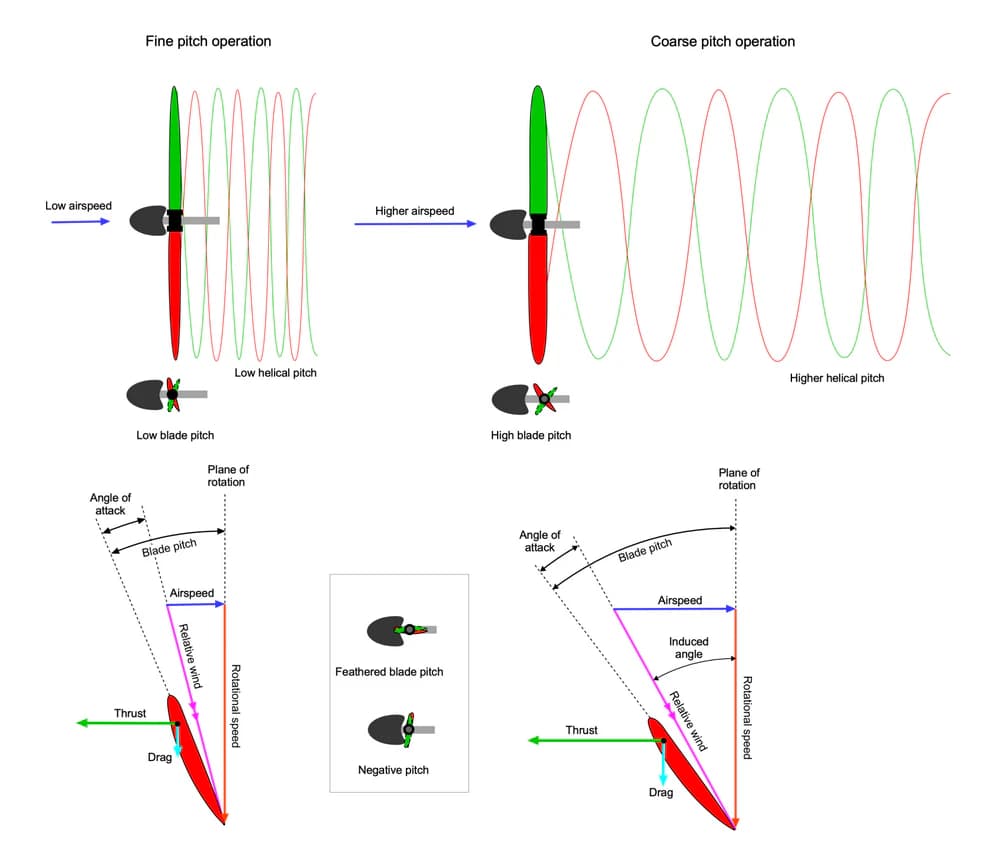
In general, a higher nominal pitch represents more aggressive blade geometry designed for greater theoretical advance per revolution.
In practice, this often increases the aerodynamic load on the motor and can increase current draw and heat, depending on the complete motor, propeller, battery, and aircraft combination.
A lower-pitch propeller generally favors smoother throttle response and lower power demand, while a more aggressive propeller can provide stronger acceleration and higher speed potential at the cost of greater load.
Here is a simplified comparison for typical 5-inch FPV props:
| Pitch tendency | Flight character | Motor and battery load |
|---|---|---|
| Lower | Smooth, controllable, forgiving at low throttle | Generally lighter |
| Mid-range | Balanced speed and control | Moderate |
| More aggressive | Punchier, faster, stronger acceleration | Generally heavier |
These are general tendencies. Blade shape, chord, pitch distribution, material, motor choice, battery voltage, and the complete propeller design also affect the result.
If you remember one thing from this section, make it this: pitch is part of the personality of the propeller.
Two props with the same diameter and blade count but different nominal pitch can make the same drone feel noticeably different in throttle response, speed, and motor load.
Blade Count: Two, Three, or Four
The third value in an explicit specification such as 5.1×4.1×3 is the blade count.
With otherwise comparable propeller geometry, adding blades generally increases the total blade area interacting with the airflow. This can improve grip and control, but it also tends to increase aerodynamic load and reduce efficiency.
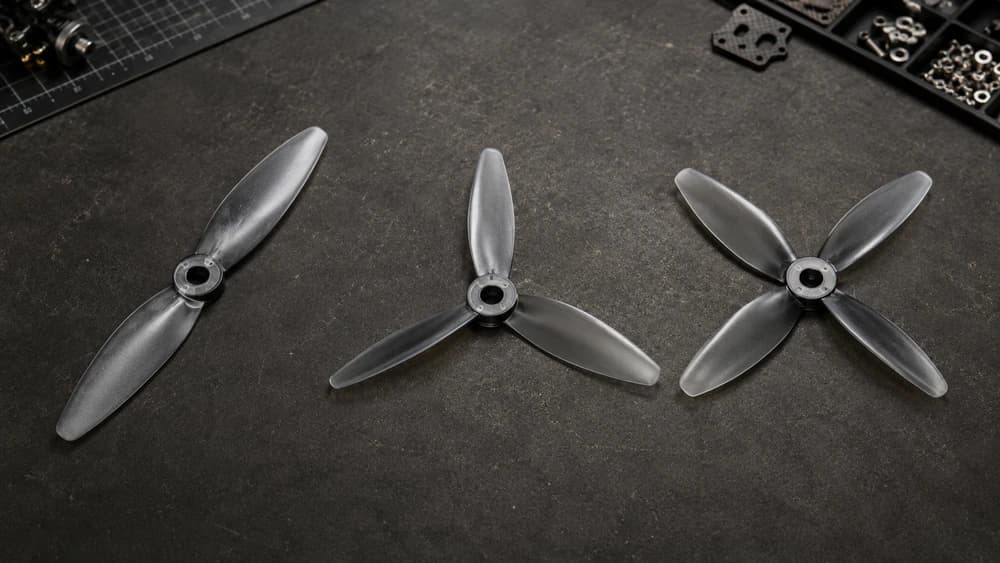
| Blades | General tendency | Efficiency tendency | Common applications |
|---|---|---|---|
| 2 | Lower blade area and a lighter rotational feel | Generally higher | Long-range and efficiency-focused builds |
| 3 | Strong grip and predictable control | Balanced | Freestyle and racing |
| 4+ | More blade area and aerodynamic load | Generally lower | Specialized setups where additional grip or a specific flight feel is desired |
These are general tendencies, not fixed rules. Blade shape, chord, pitch distribution, material, motor choice, and overall propeller design also affect how a prop performs.
Three blades are common on 5-inch freestyle builds because tri-blades offer a practical balance between grip, efficiency, and predictable handling.
For a beginner, a well-documented tri-blade designed for general 5-inch use is usually a sensible starting point.
Why Propeller Size and Pitch Work as a System
The propeller specification is not just a description of the propeller. It is part of the aerodynamic load you are asking the motors, ESCs, and battery to support.
Diameter, nominal pitch, blade count, blade shape, and overall propeller geometry all influence the load placed on the motor.
In general, increasing diameter, using more aggressive pitch, or adding blade area can increase the torque and power required from the motor. But the exact result depends on the complete motor–propeller–battery combination.
Ask too much from the power system and the motors may pull excessive current, run hot, and place unnecessary stress on the ESC and battery.
This is why you should check the motor manufacturer's compatibility information, recommended setup, and available thrust-test data whenever possible.
The propeller may be one of the cheapest components in the power chain, but it has a major influence on how hard the rest of the system has to work.
The practical rule is simple: change one variable at a time.
If the drone feels sluggish, test a different propeller within the range supported by your power system. If the motors consistently come back excessively hot, propeller load should be one of the first things you review.
Do not jump from a mild propeller to a much more aggressive design and assume the motor, ESC, and battery will respond the same way.
What Props Should a Beginner Use?
For a first 5-inch build, a well-documented tri-blade designed for general freestyle or balanced 5-inch use is usually a more sensible starting point than choosing a propeller by the highest pitch number you can find.
Do not choose a propeller from pitch alone.
Check the complete propeller model, the manufacturer's specifications, and the motor manufacturer's compatibility or test data when available.
A propeller explicitly specified around the common 5-inch tri-blade class can be a practical starting point, but the exact choice should match your motors, battery voltage, all-up weight, and intended flying style.
For a beginner, predictable throttle response and a well-matched power system matter more than chasing maximum theoretical speed.
Skip the temptation to buy the most aggressive racing propeller you can find just because the pitch number is high. More load can mean faster battery sag, hotter motors, and a throttle response that is harder to manage while you are still learning.
Speed is a skill you grow into, not a specification you buy.
And buy plenty of sets. Props are consumables. Props are usually the first thing to break in a crash, and as a beginner, crashing is part of the learning process.
A damaged, bent, or badly chipped propeller can create vibration and strange flight behavior. Replace questionable props instead of continuing to fly them.
Common Beginner Mistakes with Props
The first classic mistake is mixing propellers.
All four propellers should use the same model and specification. Mixing different prop designs can create inconsistent thrust, motor load, and vibration that software tuning cannot fully compensate for.
The second mistake is ignoring the full propeller specification and buying only by price or appearance.
Two props can look very similar on a store page and still behave differently because of pitch, blade shape, blade count, material, and overall geometry.
The third mistake is treating every product code as a dimensional specification.
A compact code may be a manufacturer-specific model or type designation. If the naming convention is not explicitly defined, check the official product specifications instead of guessing.
The fourth mistake is over-propping: installing a propeller that places more load on the power system than the motors, ESC, or battery can comfortably support.
The drone may still fly, but excessive current and heat are warning signs. If your motors consistently return excessively hot after a normal flight, propeller load is part of the troubleshooting conversation.
FAQ: Propeller Size and Pitch
What pitch propeller is best for beginners? There is no universal pitch number that is best for every beginner 5-inch build. Start with a well-documented tri-blade that matches your motor, battery voltage, and intended use. For a first build, prioritize predictable handling and manufacturer compatibility over an aggressive pitch number.
Can a more aggressive propeller damage my motors? Potentially, yes. A propeller that places excessive aerodynamic load on the motor can increase current draw and heat. Pitch is one factor, but diameter, blade count, blade geometry, motor KV, battery voltage, and aircraft load also matter. Check manufacturer compatibility and test data whenever possible.
Does a code like 51466 always describe diameter and pitch? No. Some manufacturers use product, type, or model codes that should not be decoded as dimensions automatically. If the specification is not written explicitly, check the official manufacturer's data.
What's Next
You now know how to read an explicit propeller specification and, just as importantly, when not to decode a product code by assumption.
Diameter, pitch, and blade count are useful starting points, but the complete propeller geometry and the rest of the power system determine how the drone actually behaves.
The next logical step in the build sequence is the hardware those props attach to: installing your motors the right way, including screw length, wire routing, and the mistakes that cost beginners real money.
And remember the golden safety rule from that lesson: propellers only go on at the very end, right before flight. Until then, they stay in the bag.